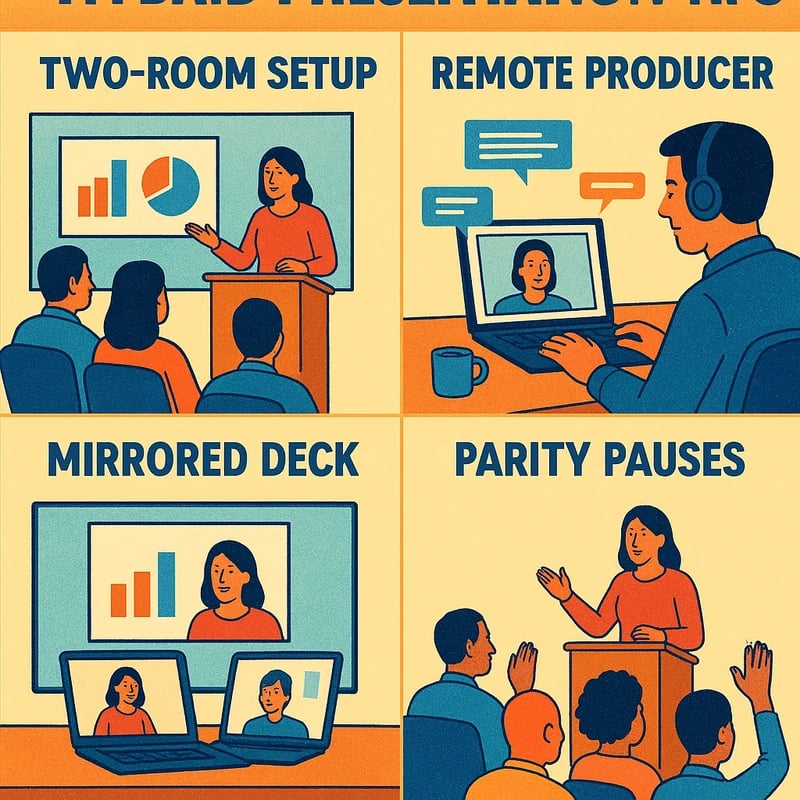
Discover hybrid presentation tips to own two-room meetings: assign a remote producer, mirror decks, and use parity pauses for every audience today.
Quick Answer
Hybrid presentation tips start with two simple roles and two clear channels: designate a remote producer to own the remote audience, and run a dual-channel Q&A (live mic for in-room, moderated chat/Slido for remote). Timebox parity pauses, and pre-build AI prompts for offline prep rather than live generation. Treat two rooms as one show with mirrored timing, clear handoffs, and a shared deck link so both sides see the same visuals. Key takeaway: structure and roles conquer disengagement.
Complete Guide to How to run a hybrid executive presentation without losing your remote audience (hybrid presentation tips)
Two-room meetings demand a production mindset as much as a speaking one. You’re not just presenting slides; you’re orchestrating attention across spaces, time zones, and communication styles. The core idea behind hybrid presentation tips is to treat in-room and remote participants as equal stakeholders, not as an afterthought. When you assign a dedicated remote producer, build a parallel playbook for remote engagement, and wire the Q&A so questions from both rooms land in the same conversation, you dramatically increase clarity, reduce interruptions, and keep pace with executive-level expectations.
- Start with two audiences, two channels, one message. The remote producer owns chat, reactions, and questions, while you as presenter drive the narrative for both rooms from a shared deck. Parity pauses—short, timeboxed moments where you invite remote questions or comments—keep both audiences aligned.
- Use a pre-seeded deck with built-in cues for parity. A single deck link, projector view, and remote-friendly notes ensure in-room and remote audiences are literally seeing the same slides at the same time. This reduces the drift between audiences when AI slide tools misfire or when live generation stalls the flow.
- Build a safe, offline AI prep habit. Create macro prompts for the remote producer and for your own prep that simulate potential questions and data requests. Resist live, improvisational AI generation during the meeting; offline prep makes live moments crisp and reliable.

What follows is a practical, field-tested framework you can apply to QBRs, roadmaps, KPI readouts, and executive reviews. Each section features concrete steps, paired with parity-focused tactics that help you keep remote participants engaged and included.
What are the best practices for hybrid meetings?
A solid hybrid playbook starts with clear roles and a rehearsed timeline. Assign a remote producer who monitors the room from the back, handles the chat, and flags unanswered questions. Create a mirrored slide flow so that the remote audience sees the same visual beats as the in-room attendees. Use parity pauses to invite remote input, and dedicate a 2–3 minute slot every 15–20 minutes for remote questions. Data points from practitioners show that when a remote producer is present, remote engagement roughly doubles compared to setups without one. Expert insight suggests that parity requires explicit choreography and timeboxing, not hope. Key takeaway: role clarity and timing are your strongest levers for hybrid presentation tips.
-
Practical steps:
- Before the meeting: lock the deck version, share the two-room agenda, and confirm the remote producer’s responsibilities.
- During the meeting: run a synchronized slide cadence, read remote chat aloud at parity pauses, and invite direct questions from remote attendees.
- After the meeting: capture a consolidated Q&A log that covers both rooms.
-
Related topics for internal linking: hybrid meeting best practices, parity in hybrid meetings, dual-channel Q&A strategies, two-room meeting tips.
How do you keep remote participants engaged in a hybrid meeting?
Engagement for remote attendees hinges on visibility, audibility, and participation opportunities. Use a dedicated remote channel (chat or a polling tool like Slido) that mirrors the in-room discussion. Keep the remote camera on when you reference remote participants so they feel connected to the present momentum. Encourage short, crisp contributions and visibly acknowledge remote input to prevent “two conversations” syndrome. A best-practice stat you’ll hear in practitioner forums is that structured prompts and explicit pauses noticeably increase remote involvement. Expert note: engagement grows when you actively curate conversation so both rooms contribute to the same narrative arc. Key takeaway: design interaction into the rhythm, not as a one-off ask.
-
Practical steps:
- Open with a 60-second ice-breaker that includes remote participants (e.g., “From the chat, who is joining remotely today and what’s one KPI you’re watching?”).
- Use a live poll every 8–10 minutes to surface remote opinions and keep them in the loop.
- When a data slide lands, read remote questions aloud and circle back to the presenter’s interpretation of remote inputs.
-
Related topics for internal linking: remote audience engagement strategies, Teams hybrid meeting tips, Zoom hybrid presentation playbook.
How can you manage Q&A for hybrid audiences?
A robust Q&A method works best when questions are captured, filtered, and answered in a single thread that both rooms can follow. Use a dual-channel approach: a quick in-room microphone for attendees who are physically present, and a moderated chat or Slido stream for remote questions. Assign a moderator (the remote producer for chat, the in-room host for the mic) to prevent cross-talk and ensure every question gets a clear, concise answer. The most successful hybrid QBRs allocate a fixed Q&A window and then lock the deck for a final wrap-up, preventing last-minute derailments. Key takeaway: treat questions as a shared resource, not a separate lottery, so both audiences hear the same answers at the same time.
-
Practical steps:
- Designate a 6–8 minute Q&A window after major sections.
- Have a live-questions-to-chat handoff protocol: a short sentence to transfer a remote question to the mic and back.
- Use a single “captured Q&A” document that logs both in-room and remote questions with answers.
-
Related topics for internal linking: dual-channel Q&A, AI prompts for hybrid presentations, two-room meeting tips.
What is a remote producer in a hybrid meeting?
A remote producer is the person whose primary job is to shepherd the remote audience through the meeting. They monitor chat, manage polls, summarize remote questions, and coordinate with the presenter to ensure in-room and remote participants share the same experience. This role is not optional if your goal is parity; it’s a core capability for the hybrid executive deck. Practitioners report that remote producers reduce the latency between questions and answers and dramatically improve perceived inclusion for remote attendees. Key takeaway: appoint a dedicated remote producer to unlock consistent hybrid presentation tips in real-time.
-
Practical steps:
- Define the remote producer’s toolkit: chat monitor, poll supervisor, deck cue caller, and Q&A consolidator.
- Sync with the presenter via a separate earpiece or quick chat channel for discreet coordination.
- Have a backup plan if the producer’s connection falters (pre-canned prompts and offline prompts).
-
Related topics for internal linking: remote producer for hybrid meetings, parity pauses, hybrid presentation tips.
How do you ensure parity between in-room and remote attendees?
Parity means both rooms see the same content, hear the same explanations, and have equal opportunities to participate. Use a synchronized deck link, a mirrored projector output, and a shared remote Q&A flow. Build explicit parity pauses into the agenda—moments when you pause to invite remote input, read remote questions aloud, and confirm that the remote audience is following along. In practice, parity improves confidence, reduces interruptions, and heightens decision quality in executive decks. Key takeaway: parity is a design choice—build it into the story and timing.
-
Practical steps:
- Create a single deck link that works for both rooms and pin a remote-access version on screen.
- Schedule quiet minutes after critical slides to surface remote questions.
- Confirm that any data points or visuals have equivalent in-room and remote context.
-
Related topics for internal linking: hybrid meeting best practices, two-room meeting tips, parity pauses for hybrid presentations.
What tools help with hybrid presentations?
Tools matter, but discipline matters more. Rely on a stable conferencing platform (Teams or Zoom), a reliable remote-poster workflow (remote producer + chat/moderation), and a simple, shared deck with offline AI prompts reserved for prep. Slido or built-in poll features help with real-time engagement; ensure you have a backup plan if AI slide assistants fail. The lesson from recent discussions is that tools should serve flow, not complicate it. Key takeaway: pick reliable tools and build a sane workflow around them to keep hybrid presentation tips practical.
-
Practical steps:
- Pre-create a Q&A log and a few standby slides that can be shown if a data slide glitches.
- Run a quick tech rehearsal focusing on the two-room flow with the remote producer.
- Keep the AI prompts offline and pre-approved so you’re not generating on the fly.
-
Related topics for internal linking: Teams hybrid meeting tips, Zoom hybrid presentation playbook, offline AI prompts for hybrid presentations.
How do you run a two-room meeting effectively?
Two-room meetings are a choreography exercise, not a generic slide deck. Start with a published two-room agenda and a cross-room handoff plan. Use parity pauses, a remote producer, and a unified deck to keep both rooms synchronized. Practice with a dry run that includes live Q&A from both sides, a backup plan for slide failures, and a clear signal when you’re about to move to a new topic. The payoff is not just smoother presentation; it’s stronger executive buy-in because both rooms feel heard and aligned. Key takeaway: rehearsed two-room mechanics yield reliable, scalable hybrid presentation tips.
-
Practical steps:
- Schedule a dry run with both room setups and the remote producer present.
- Create a “handoff script” for transitions between topics that mentions both rooms.
- Ensure a single point of truth for data, visuals, and messages.
-
Related topics for internal linking: two-room meeting tips, hybrid meeting best practices, parity pauses.
What is parity pause in hybrid presentations and how to implement?
Parity pauses are short, timeboxed moments baked into your agenda to invite questions, comments, or clarifications from remote participants. They are essential to keeping both audiences present and active. The idea is to stop, check, and reflect with both rooms; the remote producer can surface remote questions while you acknowledge the input in the room. Parity pauses reduce drift and improve the sense of shared purpose during critical KPI readouts. Key takeaway: parity pauses are a simple, powerful mechanism to maintain equal airtime.
-
Practical steps:
- Insert a 2–3 minute parity pause after each major section or KPI milestone.
- Have the remote producer pre-collect questions and surface them succinctly.
- Revisit a key slide to confirm that both rooms interpret the data the same way.
-
Related topics for internal linking: hybrid presentation tips, dual-channel Q&A, remote audience engagement strategies.
How to safely prep AI prompts for hybrid presentations?
AI prompts can accelerate prep, but you should keep live generation off during the meeting. Use offline prompts to plan likely questions, data requests, or objections, and build a quick reference guide for the presenter and the remote producer. AI-assisted prep should prime you to answer confidently, not produce content in real time. The safer approach to AI in hybrid presentations has become a best practice: offline prompts reduce risk and improve consistency. Key takeaway: prepare, don’t improvise—offline AI prompts deliver reliable extended parity.
-
Practical steps:
- Create a prompt library for common QBR questions and scenarios.
- Test prompts in a rehearsal and save responses for reference during the meeting.
- Keep any AI-generated content offline unless you’re ready to vet it and display it manually.
-
Related topics for internal linking: AI prompts for hybrid presentations, hybrid presentation tips, prep workflows.
How can you structure agenda for hybrid QBR presentations?
For QBRs, ensure your agenda foregrounds parity and engagement. Start with executive priorities, show a mirrored KPI deck for both rooms, and close with a joint Q&A that includes remote input. Timebox segments to prevent drift, and clearly designate who handles which slides and which questions. The best hybrid QBRs deliver a crisp story, measurable outcomes, and a transparent path forward that both rooms can quote back. Key takeaway: a well-structured agenda with parity-first thinking is your best ally for hybrid presentation tips.
-
Practical steps:
- Publish a one-page agenda with timings and roles (presenter, remote producer, moderator).
- Include a short “what you’ll see” preview for both rooms to minimize confusion during transitions.
- End with a unified actions list that both rooms can sign off on.
-
Related topics for internal linking: hybrid meeting best practices, two-room meeting tips, KPI readouts in hybrid format.
Practical applications and real-world scenarios
- QBR with a global executive team: mirror the KPI deck across Teams and a shared projector; the remote producer surfaces regional questions, while you address global implications in the same cadence.
- Roadmap review for a product with cross-functional leaders: parity pauses after each milestone; remote input informs prioritization without stalling decisions.
- KPI readout for a data analytics led initiative: use live charts with remote-friendly annotations; a single chat stream collects questions to be addressed in a structured Q&A.
Key takeaway: apply the two-room playbook to fit your governance rhythm, and you’ll see the same message land with both sets of stakeholders.
Why This Matters
Hybrid meetings are now a default reality in many executive workflows, and recent practitioner threads emphasize three persistent pain points: in-room voices dominating the conversation, remote attendees feeling left out of the loop, and live AI slide tools derailing the flow. The hybrid executive deck demands a more intentional, production-led approach than traditional in-person or fully remote formats.
- Data points from practitioner threads and field observations:
- In-room dominance often leads to remote disengagement unless a designated remote producer is present.
- Remote participants often report feeling unseen when questions or context are not surfaced in a timely, structured way.
- Live AI slide assists can derail flow if not prepped and vetted; offline prompts reduce risk and improve outcomes.
- Trends in hybrid leadership: more organizations are formalizing the remote producer role and instituting parity pauses to ensure both rooms speak with equal weight.
- Expert insight: the best hybrid presentation tips hinge on explicit roles, rehearsed handoffs, and a shared narrative across spaces.
Key takeaway: the cost of poor hybrid execution is measurable in lost decisions and missed opportunities; the remedy is a production-led approach that treats two rooms as one coherent show.
What this means for your readiness
-
Build a minimal but robust two-room workflow: remote producer, parity pauses, mirrored deck, and a shared Q&A.
-
Practice a short, focused rehearsal that includes a remote audience simulation and a data-accurate deck.
-
Prepare offline AI prompts to handle likely questions and data requests, so you don’t stall the meeting with untested live AI.
-
Related topics for internal linking: remote producer practices, hybrid QBR presentation tips, parity in hybrid presentations.
Key takeaway: readiness beats improvisation in hybrid executive decks.
People Also Ask
What are the best practices for hybrid meetings?
Best practices emphasize explicit roles, parity-driven agenda design, and a production mindset. Use a remote producer, a dual-channel Q&A system, and parity pauses to keep both rooms aligned. Ensure a single deck and a synchronized viewing experience so everyone shares the same visuals and timing. Key takeaway: structure and roles matter more than fancy tech.
How do you keep remote participants engaged in a hybrid meeting?
Engagement comes from visible, audible inclusion and interactive moments. Use polls, quick prompts, and direct remote questions duringParity Pauses. Acknowledge remote input by name and summarize it in your wrap-up. Key takeaway: make remote voices central, not peripheral.
How can you manage Q&A for hybrid audiences?
Adopt a dual-channel approach with a remote producer and in-room moderator. Keep a single, consolidated Q&A log and allocate a fixed window for Q&A. Ensure both rooms see the same answer content and outcomes. Key takeaway: synchronized Q&A prevents questions from getting lost.
What is a remote producer in a hybrid meeting?
A remote producer manages the remote audience experience: monitors chat, runs polls, captures questions, and coordinates with the presenter to keep both rooms aligned. This role reduces delay and increases perceived inclusion. Key takeaway: hire or appoint a dedicated remote producer.
How do you ensure parity between in-room and remote attendees?
Parity is achieved through synchronized visuals, equal speaking opportunities, and structured opportunities for remote input. Use parity pauses and a shared deck link with clear handoffs. Key takeaway: parity is built into the process, not hoped for.
What tools help with hybrid presentations?
Reliable conferencing (Teams or Zoom), a remote producer workflow, and engagement tools (polls, moderated chat). Have offline AI prompts ready and use a single deck with a shared link. Key takeaway: choose stable tools and keep the workflow simple.
How do you run a two-room meeting effectively?
Treat it as a coordinated show: define roles, lock a shared deck, run parity pauses, and ensure both rooms can contribute in real time. Practice transitions and keep a unified tone and pace. Key takeaway: practice makes parity real.
What is a parity pause in hybrid presentations and how to implement?
A parity pause is a planned, short moment where remote input is invited and integrated. Include it after major slides or KPI milestones. Key takeaway: parity pauses are a simple lever to maintain equal airtime.
How to safely prep AI prompts for hybrid presentations?
Use offline prompts to anticipate questions and data requests, then rehearse with those prompts. Avoid live AI generation during the meeting. Key takeaway: offline prep keeps flow intact.
How can you structure an agenda for hybrid QBR presentations?
Publish a parity-first, timeboxed agenda with clear roles and transitions. Ensure the data deck and narrative are consistent across rooms. Key takeaway: a well-structured agenda is the backbone of effective hybrid presentation tips.
How to practice for hybrid presenting?
Run a full-dress rehearsal with both rooms, the remote producer, and the presenter. Focus on timing, transitions, and Q&A flow. Key takeaway: practice equals predictability.
How to engage remote participants during in-person meetings?
Design moments specifically for remote input, reference remote questions, and ensure remote participation is acknowledged. Key takeaway: deliberate inclusion beats casual invitation.
How to run a hybrid executive deck without losing your remote audience?
Apply a production-first approach: remote producer, parity pauses, dual-channel Q&A, and offline AI prep. Align both rooms with a single deck and practiced transitions. Key takeaway: production governs the experience.
Next steps
- Pick a pilot meeting (a smaller QBR or roadmap review) and implement the remote-producer role, parity pauses, and a mirrored deck.
- Create a one-page “two-room playbook” for your team that defines roles, timing, and Q&A flow.
- Collect feedback after the pilot and adjust the parity cadence and Q&A routing to improve engagement.
Related topics for internal linking to explore next:
- Hybrid meeting best practices
- Two-room meeting tips
- Parity pauses for hybrid presentations
- Remote producer roles in hybrid meetings
- How to run a QBR in a hybrid setting
Key takeaway: if you want hybrid presentation tips to land, start with a concrete production plan, test it, and iterate based on real-world feedback.