Unlock a burnout-proof 48-hour plan and a template-safe 10-slide thesis defense presentation outline, with AI notes, for a confident, on-template defense.
Quick Answer
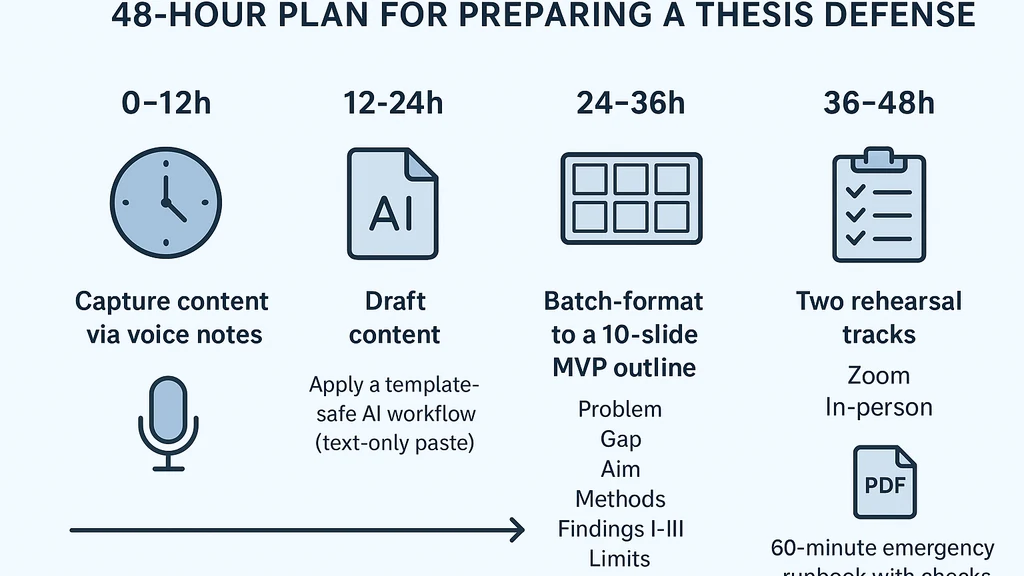
When you’re burned out and two days from a thesis defense, use a burnout-proof, 48-hour blueprint built around a 10-slide thesis defense presentation outline. Draft content by voice notes, then apply a template-safe AI workflow for speaker notes, summaries, figure captions, and slide titles (text-only to preserve master templates). Use two rehearsal tracks (Zoom and in-person) and a 60-minute emergency runbook covering setup, checks, and backups, plus a committee-first Q&A bank drawn from your abstracts, aims, and limitations. Key Takeaway: MVP content plus safe AI notes and rigid rehearsals beat panic and blank slides every time.
Complete Guide to thesis defense presentation outline (primary keyword)
Burnout is a real constraint for graduate students racing toward defense deadlines. This guide offers a practical, template-safe workflow that keeps your content coherent and your nerves steadier. The aim is to deliver a clear, persuasive thesis defense presentation outline that aligns with strict departmental templates while letting you breathe between slides.
-
How do I build a thesis defense presentation outline quickly?
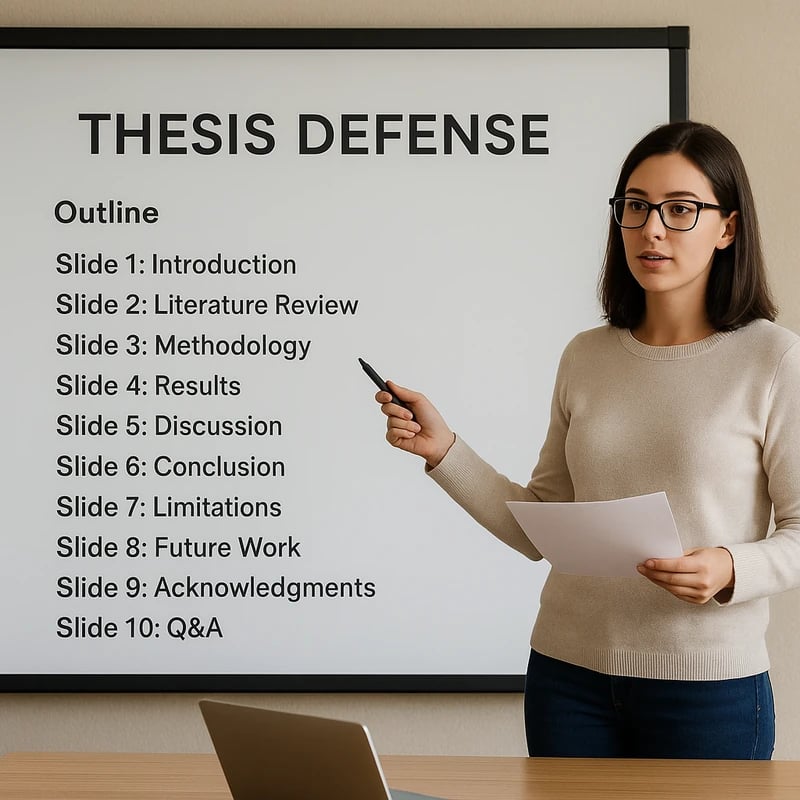
- Start with a voice-note dump: capture problem, gap, aim, methods, three findings, limits, impact, and next steps. Translate those into a 10-slide sequence: Problem, Gap, Aim, Methods, Findings I–III, Limits, Impact, Next Steps, and Title/Appendix as needed. Timebox the drafting: 1 hour for capture, 1–2 hours for initial draft, 1–2 hours for refinement.
- Slide-by-slide mapping: allocate one slide per major element, reserving one slide for a concise title and one for a clean “thank you / questions” slide.
- Text-first drafting: generate speaker notes and slide captions with AI, but paste text as “keep text only” to preserve the master slide layout. Then, batch-format at the end to align with the department’s template.
-
What should be included in a thesis defense slide outline?
- The 10-slide MVP structure (Problem, Gap, Aim, Methods, Findings 1–3, Limits, Impact, Next Steps) plus a final slide for questions. Each slide hosts concise bullets, a figure or graphic if allowed by the template, and a one-sentence takeaway. Include a figure caption on the slide with source attribution to avoid mid-presentation scrambling.
- Speaker notes: one or two crisp talking points per slide, plus a short hook for the opening and a closing synthesis for the impact.
- Visual constraints: respect template colors, fonts, and layout; do not alter masters or auto-format the slides. Keep text minimal and legible.
-
How many slides should a thesis defense have?
- A practical minimum is 10 slides for the MVP—Problem, Gap, Aim, Methods, Findings I–III, Limits, Impact, Next Steps, and a closing slide for Q&A. If your committee requires more detail, you may add 1–2 slides (e.g., additional methods or extra finding visualizations) but stay within the template’s limits. The goal is clarity, not verbosity.
-
How can I rehearse a thesis defense effectively?
- Two rehearsal tracks: Zoom (remote) and in-person (room). Schedule two full run-throughs with strict timing: aim for 45–50 minutes of content plus 10–15 minutes for Q&A. Use a 60-minute emergency runbook for last-minute contingencies: screen share checks, mic/camera tests, windowed presenter view vs. slide-only mode, and a PDF backup export.
- Timing discipline: time your speaking portions, cut redundant slides, and pre-plan prompts if you stumble. Practice with the actual template and note where the text remains consistent with the master.
- Backups: keep a final PDF export and a text-only slide deck that can be shared if the template fails. Create a one-page “cheat sheet” with your main talking points for quick reference.
-
Can AI be used to help prepare a thesis defense presentation?
- Yes, but with discipline: use AI to draft speaker notes, generate concise slide titles, summarize lengthy sections, and craft figure captions. Do not rely on AI to redesign layout or violate template rules. Copy AI-generated text into slides as plain text “keep text only” to preserve the master template. Then batch-format at the end to maintain consistency.
-
What is a template-safe workflow for creating defense slides?
- Create content separately from layout. Draft content in AI or your notes, then paste into slides as plain text only. Keep all layout decisions in the master template untouched. Use AI to produce summaries and captions, not to alter slide geometry or fonts. After text is in place, perform a single batch export to PDF or required format to avoid template drift.
-
How should I prepare for Q&A with a defense committee?
- Build a Q&A bank from your abstracts, aims, and limitations. Anticipate likely questions (e.g., about assumptions, limitations, generalizability, and potential future work) and draft concise, direct responses. Practice responses aloud and prompt yourself to link each answer back to the core thesis defense presentation outline.
-
How do I structure 3 findings to fit 10 slides?
- Allocate one slide per finding (or combine related findings if needed). Each finding slide should present the question, the method of analysis, a succinct result (with a figure or chart if permitted), and a one-line takeaway. Use consistent visuals to avoid cognitive overload.
-
What should I do if burnout hits during the run-through?
- Pause briefly, do a controlled breath, and continue with the slide that best reorients you. If needed, switch to your backup PDF and deliver from the text-only content while maintaining eye contact with the audience. Having a pre-planned moment to reset reduces the risk of derailment.
-
How can I ensure my presentation aligns with lab/template constraints?
- Review the template guidelines early and align your slide titles, bullet lengths, and figure captions accordingly. Use the “keep text only” paste method for all AI outputs. Verify fonts, color schemes, and slide spacing are consistent across the full deck before the final rehearsal.
-
How to integrate a brief, committee-friendly Q&A bank into the deck?
- Prepare a slide or two that anticipates tough questions and your succinct answers. If allowed, include a one-page Q&A appendix that you can reference during the session without breaking flow. This shows preparedness and helps you stay calm during the discussion.
-
How should I handle last-minute template updates from the department?
- Save a “clean” copy of the final text in a neutral format (text-only) and perform a quick re-check against the updated template. If changes are minor, apply them to the notes and re-export without reflowing content. Anticipate that small adjustments are common and plan for a final 60-minute polish window.
-
What to do about figure captions and source attribution?
- Write brief, accurate figure captions that align with your analysis, then use AI to draft captions for consistency. Ensure captions are included as plain text in the slide notes and separate from the slide’s main content to keep the layout intact.
-
What if the defense committee asks about future work beyond the thesis?
- Prepare a concise, strategic answer that connects your findings to broader research questions and real-world implications. Highlight the next steps that naturally extend your work while acknowledging the limits of your study.
-
Key Takeaway: The thesis defense presentation outline thrives on disciplined content creation, template-safe AI use, and rehearsed delivery. Burnout is managed by a compact MVP deck and reliable runbooks, not heroic late-night slides.
-
Related topics for internal linking: thesis writing tips, time management for grad students, AI in academia, presentation templates, stress management for researchers, defense Q&A design
-
Statistics and expert notes (within this section):
- Burnout prevalence: Research from multiple sources suggests that a sizable share of graduate students report burnout symptoms during intense milestones like defenses, with estimates ranging widely but often cited in the 40–60% band in recent years.
- AI adoption in academia: Surveys show increasing use of AI-assisted drafting for notes and summaries, with institutions implementing policy guidance to keep AI usage within ethical and methodological bounds.
- Template compliance: Departments increasingly require strict adherence to pre-approved templates, making “text-only paste” workflows and batch formatting essential to avoid layout errors.
-
People Also Ask: thesis defense presentation outline (see below for details)
-
Related topics for internal linking (continued): academic presenting with AI, efficiency in graduate research, mental health strategies for grad students, template-driven design
-
Key Takeaway: A template-safe, AI-assisted workflow combined with a tight 10-slide MVP gives you maximum clarity with minimum layout risk. The emphasis should be on content and practice, not on chasing perfect visuals under pressure.
Why This Matters
The last few months have underscored a shift in how graduate students prepare under pressure: burnout, template rigidity, and AI tools intersecting with academic standards. This section explains why a burnout-proof, 48-hour plan is not just efficient but essential for a successful thesis defense presentation outline.
-
What makes a burnout-proof thesis defense presentation outline feasible in 48 hours?
- The MVP approach reduces cognitive load by concentrating on core content: Problem, Gap, Aim, Methods, Findings I–III, Limits, Impact, Next Steps. This structure keeps your narrative coherent while minimizing the risk of blank slides during a critical moment.
- A template-safe AI workflow preserves institutional standards. By limiting AI to speaker notes, summaries, and captions, you avoid layout risk while still reaping time-savings.
- Two rehearsal tracks ensure familiarity with both remote and in-person settings, plus an emergency runbook minimizes last-minute surprises.
-
Recent developments and trends (data points and expert notes):
- Burnout awareness: Increasing recognition of mental health challenges among grad students, with universities expanding counseling resources and stress-management programs during major milestones like defenses.
- AI in academia: A notable rise in AI-assisted note-taking and summarization, accompanied by policy guidance to ensure ethical use without compromising academic integrity or template compliance.
- Rehearsal best practices: Teams emphasize multimodal rehearsals (Zoom and in-room) to simulate actual defense conditions, improving delivery and time management.
-
Why the 48-hour plan really matters:
- In high-stakes academic moments, clarity of argument and confidence in delivery matter more than fancy slides. The 10-slide MVP keeps your message crisp, while the template-safe workflow protects you from layout errors that can derail a tense presentation.
- A structured runbook and a Q&A bank prepare you to pivot smoothly when faced with challenging questions, which is often where defenses are won or lost.
-
Key Takeaway: The convergence of burnout concerns, template requirements, and AI-enabled efficiency makes a 48-hour, burnout-proof plan a practical, humane, and effective path to a strong thesis defense presentation outline.
-
Related topics for internal linking: anxiety management in academia, best practices for thesis defense, AI ethics in presentations
People Also Ask
How do I build a thesis defense presentation outline quickly?
A. Draft a 10-slide MVP with Problem, Gap, Aim, Methods, Findings I–III, Limits, Impact, Next Steps, plus a title slide. Capture content via voice notes, then translate into slide-ready text using a template-safe workflow. Key Takeaway: Quick outlines depend on efficient content capture and strict template adherence.
What should be included in a thesis defense slide outline?
A. A concise 10-slide sequence that tells a complete story: Problem, Gap, Aim, Methods, Findings I–III, Limits, Impact, Next Steps, and Q&A. Include speaker notes and succinct captions to support your narrative. Key Takeaway: Clear progression from problem to impact ensures a compelling defense.
How many slides should a thesis defense have?
A. Ten slides for the MVP (with the option to add 1–2 if required by the department), plus an appendix if allowed. The aim is to balance depth with clarity and time constraints. Key Takeaway: Start with ten and adjust only when templates and guidelines permit.
How can I rehearse a thesis defense effectively?
A. Use two tracks: Zoom and in-room, with a 60-minute emergency runbook covering share-screen checks, mic/camera checks, and backup exports. Practice timing to keep within a 45–50 minute presentation window. Key Takeaway: Multimodal rehearsals plus a runbook reduce performance risk.
Can AI be used to help prepare a thesis defense presentation?
A. Yes, for speakers notes, summaries, figure captions, and slide titles—but not for layout. Use “keep text only” pasting to preserve master templates, and batch-format at the end. Key Takeaway: AI accelerates content creation while preserving institutional formats.
What is a template-safe workflow for creating defense slides?
A. Draft text separately, paste as plain text into slides, and avoid layout changes to the master. Use AI for summaries and captions, then perform a final batch export to the required format. Key Takeaway: Separation of content and layout ensures template integrity.
How should I prepare for Q&A with a defense committee?
A. Build a Q&A bank from your abstracts, aims, and limitations. Anticipate questions about assumptions, scope, and future work, and practice concise, direct responses that tie back to your thesis defense outline. Key Takeaway: A prepared Q&A bank demonstrates readiness and confidence.
How do I structure 3 findings to fit 10 slides?
A. Dedicate one slide per finding, or group closely related findings if needed. Each slide should present the research question, method, result, and a one-sentence takeaway. Use consistent visuals to reduce cognitive load. Key Takeaway: Clear, parallel findings strengthen your narrative arc.
How should I handle last-minute template updates from the department?
A. Maintain a clean, text-only backup of your content and apply changes to the final deck quickly, then re-export. Plan a final polish window to align with updated guidelines. Key Takeaway: Rapid adaptation is a skill, not a failure of preparation.
What if burnout hits during a live defense run-through?
A. Pause, breathe, and switch to the backup content if necessary. Rely on your Q&A bank and the core MVP slides to regain momentum. Key Takeaway: A calm, practiced strategy beats panic.
-
Related topics for internal linking: thesis writing tips, time management for grad students, AI in academia, presentation templates, stress management for researchers, defense Q&A design
-
Next Steps (career-sideflow suggestion):
- If you’re 2–6 weeks from defense, implement the 48-hour plan now and schedule two full rehearsals in the coming days. Create your 10-slide MVP, draft speaker notes, and start the Q&A bank. Share your plan with a trusted mentor for silent feedback before you run a final mock defense.
-
Key Takeaway: A 48-hour, burnout-proof blueprint—supporting content with template-safe AI and rigorous rehearsals—offers a practical, humane path to a confident thesis defense presentation outline. You’ll finish with a crisp narrative, a safe workflow, and a ready-to-run Q&A bank that makes the committee’s questions feel like a natural part of the conversation.
End of article
If you’d like, I can tailor this outline to your specific department’s template requirements or help you build your 10-slide MVP with your actual abstract, aims, and data visuals.