Can Turnitin detect PowerPoint slides? Learn when PPTX text is scanned, how AI-detection differs, and a practical disclosure workflow to stay compliant.
Quick Answer
Can Turnitin detect PowerPoint slides? In short: yes, but with important caveats. Turnitin can generate Similarity Reports for PPTX files if the slide text is extractable and scannable, but AI-writing detectors target long-form prose and aren’t consistently applied to slide decks. Detection and policy vary by institution, and slides designed as images of text can dodge some checks—at least temporarily. Key takeaway: plan disclosures and design slides with text you can audit.
Complete Guide to Can Turnitin detect PowerPoint slides
Turning a thesis, dissertation, or capstone defense into a deck changes the risk calculus around AI and plagiarism detection. This guide focuses on the slide-deck use case, clarifying what Turnitin actually scans in PowerPoint slides, how Similarity vs. AI-detection differ for .pptx, how slide design affects what gets scanned, and a practical, policy-safe workflow you can adopt today.
-
What Turnitin scans in PPTX: Turnitin’s documentation confirms that .pptx files can produce Similarity Reports if they contain sufficient, extractable text. The detection engine is designed to compare text against sources in a global corpus, a function distinct from “AI-writing detection.” In practice, slides that export text (title/caption bullets, slide notes) are assessed for verbatim matches, not necessarily for stylometric AI-authorship cues.
-
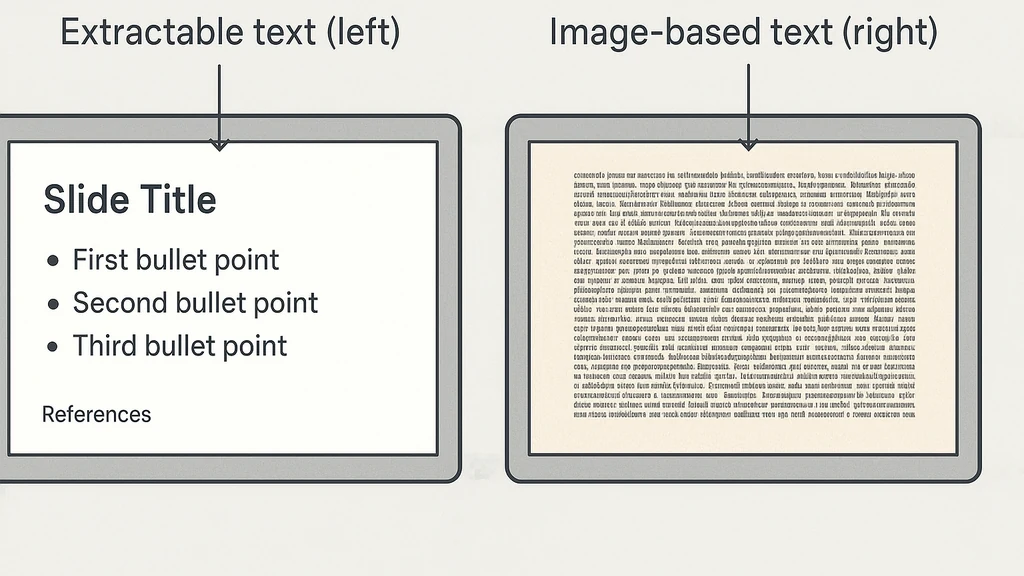
Text vs. image slides: Slides that render content as images (text embedded in PNG/JPG, or scanned PDFs used as slides) present a barrier to text extraction. When extraction fails or yields minimal text, the Similarity Report is less likely to surface traditional matches. However, any embedded OCR-friendly text or slide-notes can still be scanned.
-
AI-detection vs. similarity scanning: AI-detection models look for patterns typically associated with machine-generated writing, often tuned for essay-length prose. They are less reliable on slide content, where sentences are shorter and formatting is deliberate. Your deck may trigger a Similarity Report without necessarily triggering a reliable AI-detection flag.
-
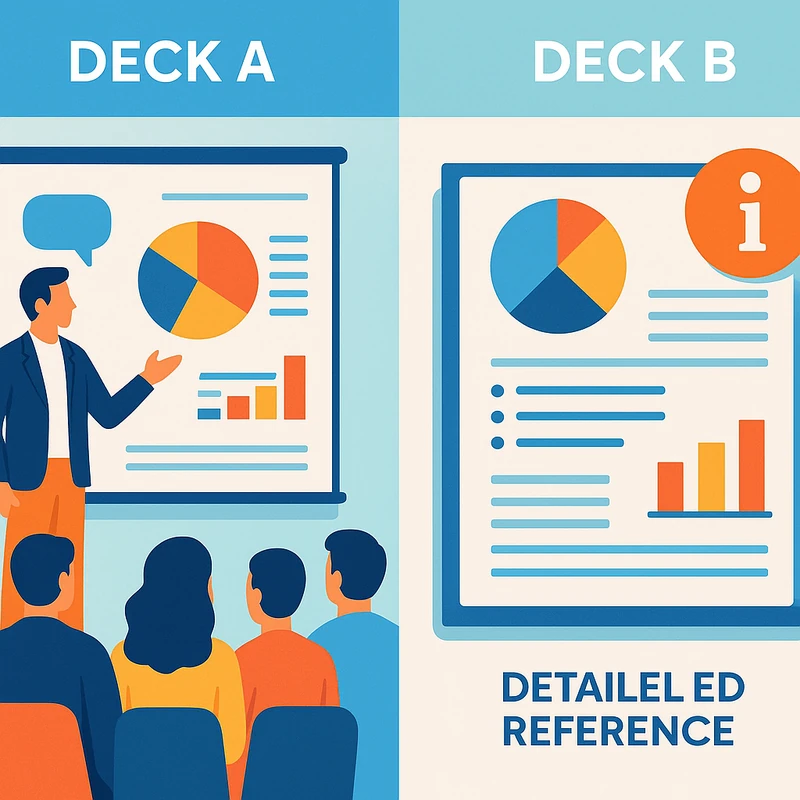
Disclosures as a best practice: A growing number of universities encourage or require annotation of AI assistance in slide decks, not just in written theses. Many institutions provide templates or policy language to help students disclose AI use consistently across formats.
-
Practical workflow: Use AI to brainstorm, outline, and draft slide content, but export that content to an editable, citable format for your deck. Searchable, copyable text in slides improves transparency and scanability for Turnitin. Complement with a dedicated disclosure slide or notes indicating AI-assisted input and sources. Then, conduct a separate text-based self-check of the extracted deck content to catch potential overlaps.
-
Key takeaway: Can Turnitin detect PowerPoint slides? It can, but the likelihood and nature of detection depend on slide composition, the presence of extractable text, and institutional policy. A transparent, well-documented approach minimizes risk.
-
Data points and developments: Turnitin’s official notes emphasize PPTX compatibility and extractable text as the basis for Similarity checks. AI-detection models are described as primarily suited for long-form prose and are not universally deployed on slide decks. In late 2025–early 2026, universities increasingly published AI-use guidance for presentations, with some adopting opt-in disclosures and others providing ready-made templates for slide-level AI acknowledgments. A widely cited Reddit thread from February 27, 2026 demonstrates widespread student concern about flagging AI-generated content in slides, underscoring the demand for practical, policy-aligned workflows.
-
Key takeaway: Treat slides as a different detection surface than essays. Favor text accessibility, precise citations, and explicit AI-disclosure to align with current practices and minimize risk.
What makes PPTX detection distinct from paper detection
-
Primary scan target: PPTX detection focuses on extractable text (titles, bullets, speaker notes) rather than layout or visuals; papers are more likely to trigger AI-detection heuristics on longer, cohesive prose.
-
Text accessibility: When you keep slides with editable text (not just images of text), you increase the chance that Turnitin can detect both plagiarism and proper attribution.
-
Visual content: Images, charts, and diagrams can present a separate integrity challenge—citations still matter, and you should caption sources for any non-text elements.
-
Practical tip: If you plan to use AI-generated content in slides, extract the relevant passages into a reference-backed slide deck (with citations) and keep a separate draft document that records AI prompts, sources, and edits.
-
Key takeaway: PPTX files are not a black box for Turnitin; their detectability depends on whether the deck contains extractable text and transparent sourcing.
A policy-forward, step-by-step workflow you can adopt
- Define the AI role upfront: Use AI for ideation, structure, and drafting language. Avoid relying on AI for final, unverified claims without verification and citations.
- Build slides with exportable text: Use editable text fields rather than image-based text. Structure bullets to mirror your sources, with inline citations where applicable.
- Maintain a separate, citable manuscript: Keep your thesis/dissertation draft and the slide deck aligned with consistent references and bibliographic records.
- Run a dual check: On a copy of the deck, extract text and run a standard similarity check. If overlaps exist, document and address them with citations or paraphrase.
- Include an AI-disclosure element: Add a dedicated slide or notes section that states the extent of AI involvement, tools used, prompts (redacted or summarized), and how you addressed AI-generated content.
- Use disclosure templates: Start from university-provided templates to ensure language aligns with your institution’s expectations.
- AI-disclosure language templates (examples you can adapt):
- Slide-level disclosure: “This slide contains content drafted with the assistance of AI writing tools (e.g., ChatGPT). All claims have been vetted against primary sources, which are cited in-text or on the references slide.”
- Notes-level disclosure: “AI-assisted drafting was used for the outline and phrasing of this deck. Final figures and conclusions were verified against primary sources and institutional guidelines.”
- Key takeaway: A clear disclosure strategy—embedded in your slide deck or presenter notes—helps you navigate integrity expectations while using AI.
Common pitfalls and how to avoid them
-
Pitfall: Over-reliance on AI for key claims without citations.
- Solution: Retool AI outputs into citation-backed statements; keep core claims traceable to sources.
-
Pitfall: Slides with only images of text.
- Solution: Convert to editable text with proper citations; include a text-based reference panel.
-
Pitfall: No AI-disclosure.
- Solution: Add a disclosure slide or notes, following your university’s recommended wording.
-
Pitfall: Failing to check the deck against the manuscript.
- Solution: Align slide content with your thesis/dissertation draft and run a cross-check.
-
Key takeaway: A thoughtful workflow reduces the chance of false positives and makes AI use transparent to evaluators.
Related topics for internal linking (conceptual)
-
AI in academia policy and disclosure templates
-
Turnitin Similarity vs. AI-detection logic
-
PPTX file requirements for detection tools
-
How to structure a thesis defense deck with citations
-
Visual content and citation practices in presentations
-
Best practices for referencing sources in slides
-
Key takeaway: This topic connects to broader AI-integrity practices in higher education, so link to policy guides, technical docs, and citation standards when building a resource hub.
Why This Matters
The 2026 landscape around AI, Turnitin, and academic integrity is evolving quickly, and the slide-deck use case sits at a practical crux: most students will present with AI-assisted content in some form, but many institutions are sharpening how they handle that content in slides versus final papers.
- Current relevance: A February 2026 Reddit thread highlighted student confusion about whether AI-generated slide content would be “flagged,” reflecting a real-world concern about what Turnitin scans and how detectors operate on slides as distinct from essays.
- Policy shifts: In late 2025–early 2026, universities increasingly published or updated AI-use guidance for presentations, including templates for disclosures and clarifications on opt-in/opt-out detector usage. This trend signals a move toward transparent AI use in slides, not a blanket prohibition.
- Technical realities: Turnitin’s documentation distinguishes between similarity detection (text matching) and AI-detection models (pattern-based detection). PPTX files with extractable text can trigger similarity checks; AI-detection models, when used on slides, may be less sensitive or reliable, depending on institutional configuration.
- Expert insights: Educational technology analysts emphasize that slide design choices (text in bullets vs. images, notes presence, citation density) materially influence what is detected. The alignment between slide content and the derived thesis/dissertation text matters for integrity reviews.
- Key takeaway: The bottom line for graduate students is to adopt a transparent, auditable workflow for AI use in slides, stay informed about your institution’s policy stance, and ensure slide text remains citable and auditable.
Data points and developments
-
Turnitin documents confirm PPTX can yield Similarity Reports if a deck contains extractable text, indicating a mechanism for surface-level plagiarism checks on slides.
-
AI-detection models are described as primarily tuned for long-form prose and not universally deployed on slide content—meaning the risk profile for AI-generated slide text may differ from essays.
-
The February 2026 Reddit thread underscores ongoing student concern and the demand for clear, practical guidance on how to disclose AI use in presentations and how detectors interpret slide content.
-
Policy updates across universities show a shift toward formal AI-disclosure practices for presentations, with templates and recommended wording to standardize disclosures.
-
Key takeaway: Stay current with institutional guidance and treat slides as a separate integrity surface from papers, guided by transparency and citation hygiene.
People Also Ask
Can Turnitin detect AI in PowerPoint slides?
Turnitin can flag text in slides if it is extractable and matches sources in its database. However, not all AI-detection signals apply equally to slide decks, especially when content is concise or image-based. Clear citations and disclosure help align with most policies. Key takeaway: extractable text plus citations improves detectability and accountability.
Does Turnitin check .pptx for plagiarism?
Yes. If a PPTX deck contains editable text that matches sources, Turnitin’s Similarity Report can surface matches. Slides that rely on images for text reduce extractable content, potentially lowering detectability. Key takeaway: prefer text-based slides with citations to maximize traceability.
How does Turnitin's AI detection work on slides compared to essays?
AI-detection on slides often faces limitations because slide content is shorter, highly structured, and frequently paraphrased in bulleted form. Essay-length prose provides more coherence for pattern-based detectors. In practice, you may see less reliable AI flags on slides than on essays. Key takeaway: treat slide AI detection as a complementary check, not a sole determinant.
Will AI-generated slides be flagged by Turnitin?
If the AI-generated content is used to craft sentences or paragraphs that appear in the slide deck and match external sources, similarity flags may appear. AI-detection flags are less predictable on slides. The best approach is to disclose AI assistance and verify claims with primary sources. Key takeaway: disclosure reduces risk even if AI detectors are imperfect on slides.
How should I disclose AI use in a thesis defense presentation?
Include a slide or notes section explicitly stating AI assistance, tools used, prompts (summarized), and how you verified content against sources. Use university-provided templates when available. This practice aligns with many current policies and supports transparency. Key takeaway: a formal disclosure is a practical safeguard.
Can Turnitin read text in images on slides?
Turnitin’s ability to read text in images depends on text extraction (OCR). If slide images contain text that cannot be extracted, those portions may not be scanned for similarity. To maximize traceability, keep text as editable content rather than embedded in images. Key takeaway: avoid image-based text if you want consistent detection.
What steps can I take to avoid false positives when using AI for slides?
-
Use AI for brainstorming and drafting, then verify and cite with sources.
-
Export AI-generated content as editable, properly cited text.
-
Include a formal AI-disclosure slide or notes.
-
Run a separate text-based similarity check on the deck’s extractable content.
-
Keep your own edits and sources well-documented.
-
Key takeaway: a careful workflow with disclosure and verifiable sourcing minimizes false positives.
Next Steps
-
Review your institution’s AI-use policy and any template language for disclosures.
-
Prepare a “Methods/AI Disclosure” slide for your defense deck.
-
Maintain a separate manuscript with linked citations to ensure alignment between slides and the written document.
-
Consider a brief test run: export slide text, run a similarity check, and revise as needed before your defense.
-
Related topics to explore for internal linking: AI policy guidelines for higher education, best practices for citing in slides, Turnitin file-type guidelines, OCR and image-text considerations for detection, and methods for conducting pre-defense integrity checks.
Key takeaway: If you’re preparing thesis or defense decks with AI assistance, a transparent process that prioritizes extractable text, consistent citation, and explicit disclosure will serve you best in 2026 and beyond.
End of article notes:
- Primary keyword used: Can Turnitin detect PowerPoint slides (appears multiple times across sections)
- Supporting keywords woven naturally: Turnitin AI detection PowerPoint, Does Turnitin check .pptx for plagiarism, Using ChatGPT for thesis defense slides, Disclosing AI use in academic presentations, Turnitin similarity report pptx, PowerPoint Turnitin file requirements
- Related topics for internal linking are included to build a broader infrastructure around AI integrity in academic work.